

The short answer
You connect Claude to SureCart on WordPress by updating SureCart to version 4.3.0 or later, generating an MCP server URL inside SureCart's settings, and adding that URL to Claude Desktop's claude_desktop_config.json file. The whole process takes about ten minutes. The one detail that trips up most people: if you already have other MCP servers (Slack, GitHub, Notion), you have to add the SureCart entry inside the existing mcpServers object, not as a separate block, with the commas placed correctly. Once connected, you can refund orders, create products with multi-tier pricing, build coupons, manage subscriptions, recover abandoned carts, and pull sales analytics through plain English. This guide covers the full setup, the JSON detail that catches people, and the seven use cases that actually save time.
Why this matters now
Running a WordPress store on SureCart is already a calm experience compared to most platforms. The plugin is clean, the checkout works, subscriptions don't break every other week, and you don't need a stack of add-ons to do basic things. But once your store starts growing, you still end up doing a lot of repetitive clicking. You open the dashboard for a refund. You open it again to check yesterday's orders. You open it once more to set up a quick discount code for an email you're about to send. None of it is hard. It just eats time.
This is where connecting Claude to your SureCart store changes the day-to-day. With the new SureCart MCP server (added in version 4.3.0), you can talk to your store in plain English from inside Claude Desktop. You ask for a refund, Claude does it. You ask for last week's revenue, Claude pulls it. You want to create a new product with three pricing tiers, you describe it once and it's live.
I run aaptasolutions.com on SureCart and I connected Claude to it last week. The setup took maybe ten minutes, but there was one small thing I tripped over that almost made me give up. I'll walk you through the whole process below so you don't hit the same wall.
This guide covers two things. First, how to connect Claude Desktop to your SureCart store properly, including the small JSON detail that trips up a lot of people. Second, seven specific things you can actually do once the connection is live, with the exact prompts that work.
What is the SureCart MCP and why it matters
Before we get into setup, a quick note on what we're actually connecting.
MCP stands for Model Context Protocol. It is the standard Anthropic announced in November 2024 to let AI models like Claude connect to outside tools and do real work inside them. Think of it as a clean bridge between a chat window and the software you already use. The MCP specification is open, and dozens of tools have shipped MCP servers in the last year. When SureCart added MCP support in version 4.3.0, it meant Claude could now read and act on your store data directly, not just talk about it in the abstract.
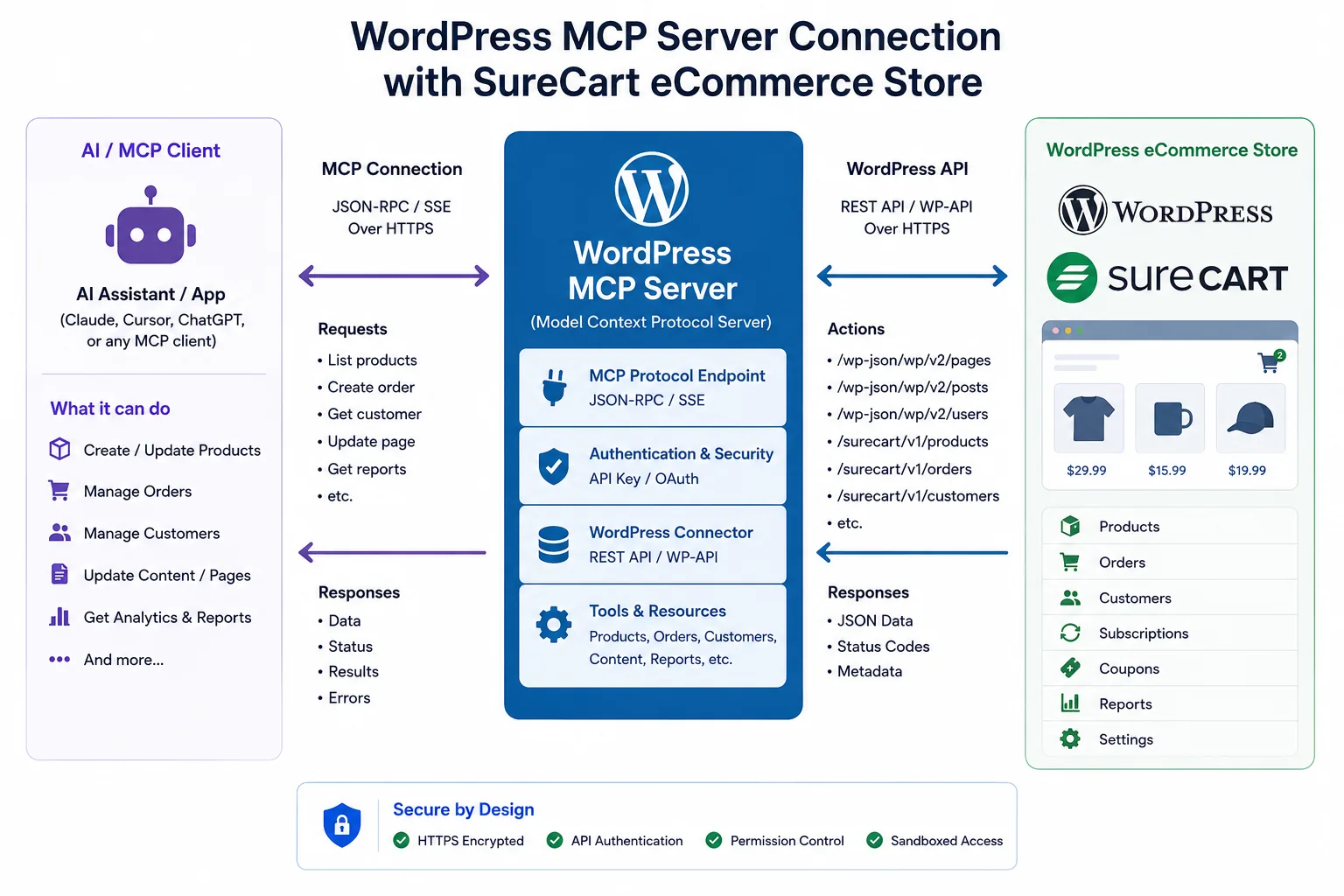
This is the part most people get wrong when they first hear about it. Claude is not writing about your store. Claude is operating your store. It is logged in. It can pull a real customer, refund a real order, build a real coupon, and read your actual revenue numbers. The chat becomes the dashboard.
The other reason this matters is permissions. SureCart MCP comes with built-in access levels, so you can keep Claude in read-only mode while you're getting comfortable, or you can give it full operational access once you trust the workflow. You stay in control of what it can touch.
If you have not used SureCart before, our SureCart review is the starting point. If you are deciding between SureCart and the alternatives, see SureCart vs WooCommerce and SureCart vs Easy Digital Downloads.
Now let's get it connected.
How to connect Claude to SureCart on WordPress
Here is the full setup. I'll go slowly because the small JSON step at the end is where most people get stuck.
Step 1: Update SureCart to the latest version
Open your WordPress admin and head to Plugins. Look for SureCart and check the version number. You need version 4.3.0 or later for MCP support. If you're on an older version, update it before you do anything else. Without this version, the MCP option won't even show up in your settings.
Step 2: Generate your MCP server URL inside SureCart
Once SureCart is updated, go to the SureCart settings inside your WordPress admin. Look for the MCP section (it sits inside the developer or integrations area depending on which version you're on).
Click to generate a new MCP server URL. SureCart will create a unique URL that includes an authentication token. Copy this URL and keep it somewhere safe. Treat it like a password. Anyone with this URL can talk to your store through Claude.
While you're here, pick your permission level. SureCart usually gives you three options:
- Read-only access lets Claude pull data but not change anything. Good for analytics and reporting.
- Edit access lets Claude make changes to products, customers, prices, and similar non-financial items.
- Advanced access lets Claude process refunds, manage subscriptions, and handle fulfillment.
I'd suggest starting with edit access and turning on advanced only when you're sure of the workflow. You can always change this later.
Step 3: Open Claude Desktop and find the MCP config
Open Claude Desktop on your computer. Click the settings menu (top right on Windows, Claude menu on Mac). Go to Developer, then click Edit Config.
This will open a JSON file called claude_desktop_config.json in your default editor. This file is what tells Claude which MCP servers it should talk to. If you've never added an MCP server before, this file will be mostly empty or contain just a blank mcpServers object.
Step 4: Add the SureCart server to your config (this is where most people get stuck)
This is the step I want you to read twice.
If you already have other MCP servers connected in Claude Desktop (Slack, GitHub, Notion, anything), your config file already has entries inside it. When you paste the SureCart code, you need to add it inside the existing mcpServers object, not replace the whole file or paste it as a separate chunk.
Here's what a clean config with just SureCart looks like:
{
  "mcpServers": {
    "surecart": {
      "command": "npx",
      "args": [
        "mcp-remote",
        "YOUR-SURECART-MCP-URL-HERE"
      ]
    }
  }
}
But if you already have other servers, it needs to look more like this:
{
  "mcpServers": {
    "slack": {
      "command": "npx",
      "args": ["..."]
    },
    "github": {
      "command": "npx",
      "args": ["..."]
    },
    "surecart": {
      "command": "npx",
      "args": [
        "mcp-remote",
        "YOUR-SURECART-MCP-URL-HERE"
      ]
    }
  }
}
Notice the commas. Every entry inside mcpServers needs a comma after it except the last one. JSON is picky about this. If you miss a comma, or add an extra one, the whole config breaks and Claude won't load any of your servers.
This is exactly what happened to me. I had a few other MCP servers already running. I pasted the SureCart block without putting it inside the existing object, and Claude just refused to connect. Took me a few minutes of staring at the file before I realised I'd basically created a second JSON object instead of adding a new key to the existing one.
After you paste your block in, save the file. Close it.
Step 5: Restart Claude Desktop
This step is non-negotiable. Claude only reads the config file when it starts up, so any changes you make won't take effect until you fully close and reopen the app. On Mac, quit Claude with Cmd+Q (closing the window is not enough). On Windows, right-click the taskbar icon and choose Exit, then reopen.
Step 6: Verify the connection
Once Claude is back open, type something simple like "list my SureCart products" or "show me my store info". If everything's wired up correctly, Claude will respond with real data from your store. If it doesn't, the most common reasons are:
- A typo in your MCP URL
- Missing or extra comma in your JSON file
- You forgot to fully quit and restart Claude
- You pasted the SureCart block outside the existing
mcpServersobject
Go back and check those four. One of them will be the culprit.
Once you see real data come back, you're done. You have a working Claude to SureCart connection. Now let's talk about what to do with it.
7 powerful things you can do with Claude and SureCart
These are not theoretical use cases. These are the workflows that actually save time once you're connected. I've tested all of them on my own SureCart store and they work.
1. Run your entire product catalog through conversation
Adding a new product on most eCommerce platforms is a tab-heavy process. You create the product. You add a description. You attach an image. You set up the pricing. You configure variants. You toggle visibility. You save. You forgot the SKU. You go back.
With Claude connected, you describe the product once and it gets created with everything in place.
A prompt like this works:
"Create a new product called Aapta Premium Consulting Package. Add three prices: a one-time consultation at 299 dollars, a monthly retainer at 999 dollars per month, and an annual plan at 9999 dollars per year. Add a short description about strategy and implementation support."
Claude reads your request, calls the right SureCart endpoints, and the product appears in your dashboard with all three pricing tiers attached. You can then ask it to duplicate the product if you want a similar one, archive products that aren't selling, or bulk update prices across a group of products.
This is especially useful when you're testing offers. The friction of creating new pricing variations usually stops people from experimenting. Once the friction is gone, you experiment more, which usually means you find better prices.
2. Handle refunds and customer issues in one conversation
This is probably the workflow I use most. A customer emails about a refund, you find them in the system, check their order, process the refund, and reply. Normally that's four tabs and ten minutes. With Claude it's one prompt.
Try something like this:
"Find the customer with email [email protected]. Show me their last three orders. Refund the most recent one and mark it as customer requested."
Claude pulls the customer, lists the orders, processes the refund, and gives you a summary you can paste into your reply email. If the customer also had an active subscription you wanted to cancel, you add that to the same prompt and it gets done in the same step.
You can also ask broader questions:
- "Show me all refunds processed this week and the reasons."
- "Find any customers who've had more than two refunds in the last 60 days."
- "What's our average refund amount this month compared to last month."
These are questions you would normally avoid asking because pulling the data is tedious. When asking takes ten seconds, you ask more, and you start spotting patterns earlier.
3. Launch promotions and coupons in seconds
Setting up a discount in any eCommerce platform involves more steps than it should. You create a coupon. You set the discount type and amount. You decide if it's percentage or fixed. You set redemption limits. You set expiration dates. You create a promotion code that maps to the coupon. You attach it to the right products or pricing rules.
Or you can just say:
"Create a 20 percent off coupon called SUMMER20 valid from June 1st to June 15th. Limit to 200 total redemptions. Apply it to all products."
Claude builds the coupon, creates the matching promotion code, sets the dates, applies the redemption cap, and confirms it's live. You can then test it by asking "is SUMMER20 active and how many times has it been used".
For flash sales, this changes the operational rhythm. The reason most store owners don't run more promotions isn't lack of ideas. It's the friction of setup. Remove the setup, and the promotion cadence goes up. More promotions usually means more revenue, especially around holidays and product launches.
4. Manage subscriptions without opening the subscription tab
If you sell anything recurring (memberships, courses, software, retainers), subscriptions are where most of your customer-management work lives. Claude can handle the entire subscription lifecycle through conversation.
Some examples that work:
- "How many active subscribers do we have right now."
- "Show me all subscriptions that failed to renew in the last 14 days."
- "Cancel the subscription for [email protected] at the end of their current billing period."
- "Extend the renewal date for this customer by 30 days as a goodwill gesture."
- "Which subscription plan has the highest churn rate this quarter."
Failed renewals are the big one. They represent revenue that's about to disappear, and most store owners don't check them often enough because it's annoying to dig through reports. With Claude, you can make this a daily two-second check. You ask the question every morning, you see the list, you reach out before they churn.
5. Recover abandoned checkouts faster
Abandoned checkouts are one of the most underused recovery opportunities in eCommerce. You know there are real people who got far enough to enter their email but didn't finish. Most of the time, all they need is a small nudge.
The reason most stores don't act on this is that pulling the data and acting on it takes effort. Claude removes the effort.
- "Show me all abandoned checkouts from the last 7 days where the cart value was above 100 dollars."
- "List abandoned checkouts that haven't been sent a recovery email yet."
- "For each abandoned checkout above 200 dollars in the last 14 days, give me the customer name, email, and what was in the cart."
Once you have the list, you can either reach out manually with a personal note (which converts way better than automated recovery emails) or pass the data to a recovery campaign in your email tool. The point is you actually see the data and act on it, instead of letting it sit unread inside a report.
6. Pull real sales insights without opening analytics
Most SureCart store owners look at sales numbers maybe once a week, and only the headline figures. The deeper questions go unanswered because nobody wants to set up a custom report just to find out which product sold best on Tuesdays.
With Claude, you ask the question directly.
Examples that work:
- "What was my total revenue this week compared to last week."
- "Which product sold the most units last month."
- "Break down sales by day for the last 30 days."
- "What's our average order value this quarter."
- "Which products have the highest checkout abandonment rate."
- "Compare subscription revenue against one-time purchase revenue for the last 90 days."
Claude pulls the data from your store, does the math, and gives you a clear answer. You can ask follow up questions in the same conversation. You can ask it to put the result into a table you can copy into a doc. You can ask for the same comparison this time next month and schedule it as a recurring task.
The change here is not just speed. It's accessibility. When asking a sales question takes five seconds instead of fifteen minutes, you ask twenty times more questions, and you start making decisions based on data instead of gut feel.
7. Fulfilment and shipping without the repetition
For stores that ship physical products, fulfilment is the most repetitive part of the day. Open the order. Mark it shipped. Add the tracking number. Save. Next order. Repeat thirty times. It's not hard work. It's just boring, and boring is where mistakes creep in.
With Claude, the workflow shortens significantly.
- "Show me all unfulfilled orders from today, sorted by order date."
- "Mark order number 4521 as shipped using tracking number 1Z999AA10123456784 via UPS."
- "List all fulfilments from this week that don't have tracking numbers attached."
- "For order 4536, create a fulfilment for the two items shipped today and add the carrier as DHL."
You're still doing the actual packing in the real world, of course. But the admin layer that sits on top of physical fulfilment gets cut by 80 percent. For growing stores, that's the difference between needing to hire a part-time ops person and not needing to.
The broader WordPress MCP landscape
SureCart is one of the first major WordPress plugins to ship a proper MCP server, but it will not be the last. WordPress as a whole is moving toward AI-native integration through the WordPress Abilities API and broader MCP adoption across the plugin ecosystem.
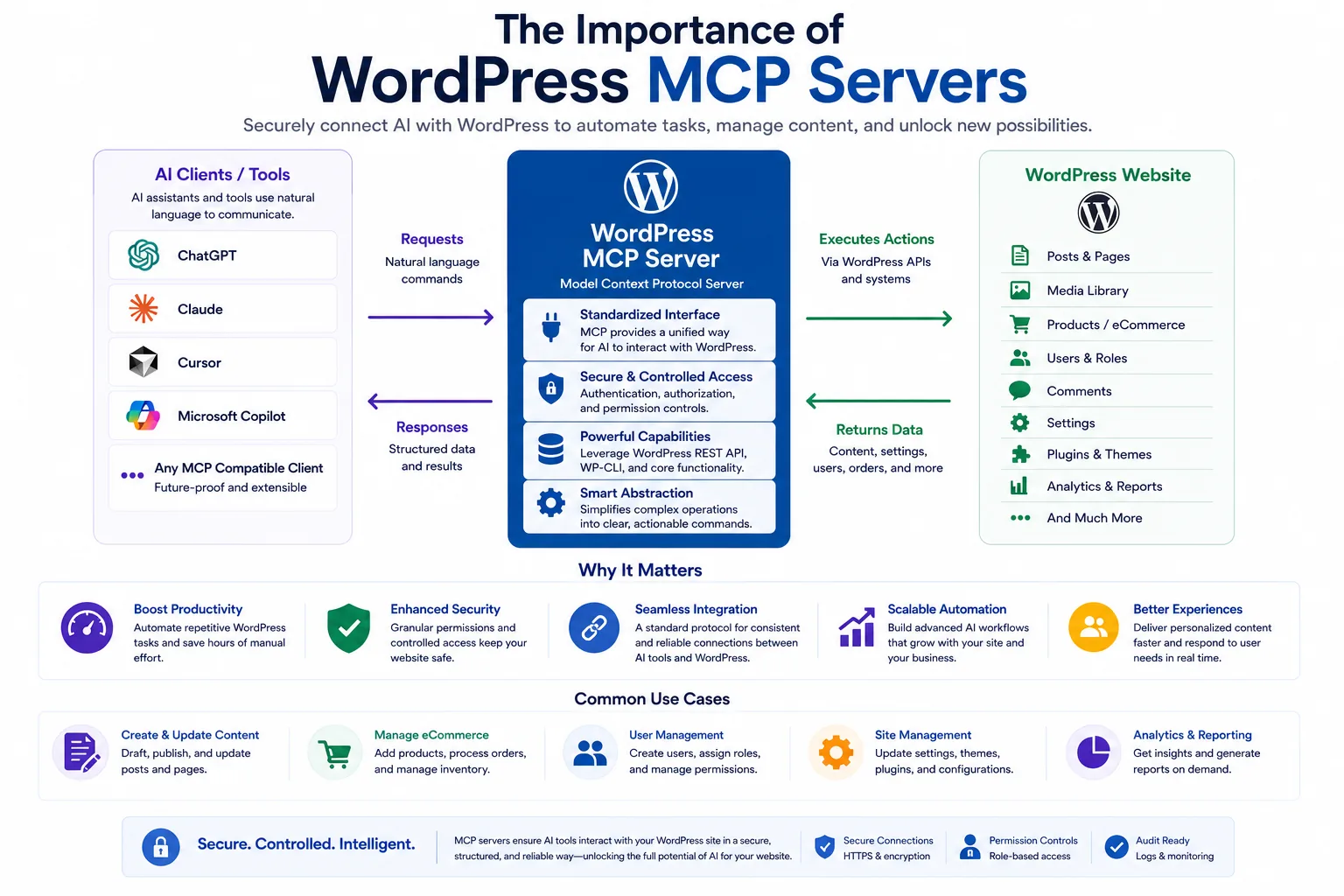
A few patterns to expect through 2026 and 2027.
More WordPress plugins will ship MCP servers. Gravity Forms, FluentCRM, WooCommerce, MemberPress, AffiliateWP - any plugin that holds operational data is a natural fit for MCP. The plugins that ship first will get a structural advantage: store owners who connect once are unlikely to migrate to a competitor that does not support the same conversational interface.
MCP servers will become a standard feature, not a premium one. Today some MCP servers are paid add-ons. By the end of 2026, the bar will move. Plugins that charge for MCP will lose to plugins that include it.
Multi-MCP setups will become normal. The config file that today has one or two entries will routinely have a dozen. Claude Desktop will quietly become the most-used interface to your WordPress stack - not because anyone planned it that way, but because asking is faster than clicking.
For the moment, SureCart's MCP is one of the cleanest and most complete on WordPress. If you're already on SureCart, you have a head start. If you're choosing between platforms, the MCP support is a real consideration.
A few things to keep in mind
A short list of practical things I've learned since connecting Claude to my own store.
Always start in read-only mode. Spend a couple of days just asking questions and seeing the data come back. This builds your confidence and lets you spot edge cases before Claude has permission to change anything.
Use natural language, but be specific. Saying "refund the last order" is fine, but "refund order number 4521 with reason customer requested" is faster and removes ambiguity.
Confirm before destructive actions. Claude will usually ask you before processing refunds or cancelling subscriptions, but it's worth getting in the habit of saying "show me first" before "do it". Once a refund is processed, it's processed.
Save common prompts somewhere. Once you find a prompt that pulls exactly the data you want (your daily sales summary, your refund report, your abandoned cart list), keep it in a note. You'll reuse it every day.
Watch your MCP URL. It's the key to your store. Don't paste it into screenshots, don't share it in support tickets, and rotate it if you suspect it leaked.
Where this leaves you
The shift here is subtle but real. For years, running an online store meant learning where things lived inside a dashboard. You memorised which menu held subscriptions. Which screen showed refunds. Which report had the numbers you needed for your Monday review. Over time, the act of running the store became almost as much about operating software as it was about growing the business.
Connecting Claude to SureCart flips this. You no longer need to know where things live, because you don't have to go and find them. You describe what you want to happen, and it happens. The dashboard is still there when you need it for design, layout, and the things Claude can't touch. But the operational layer (the part of the day that used to fill up with tab-switching and clicking) moves into a single chat window.
I've been running my own store this way for a few weeks now and the change is most obvious in the small things. Refunds happen during the email reply instead of in a separate session. Sales numbers come up in passing rather than as a scheduled report. Coupons get tested twice as often because setting one up takes ten seconds instead of fifteen minutes.
If you're running a SureCart store and you haven't connected Claude yet, it's worth the ten minutes. Just remember the JSON comma. That one detail is what stands between most people and a working connection.
If you want help setting up SureCart properly in the first place (or migrating to it from WooCommerce, Easy Digital Downloads, or another platform), see our WordPress service hub and the dedicated SureCart implementation page. And if you are watching the broader AI-and-SEO shift across WordPress, our Aapta SEO AI platform tracks how AI engines like Claude, ChatGPT, Perplexity, and Gemini cite your content, monthly. The same Claude model that operates your SureCart store also decides whether to cite your articles in answers - and that's a whole separate optimisation surface we covered in How to Rank on ChatGPT.
FAQ
What is SureCart MCP exactly?
SureCart MCP is the connection layer that lets Claude talk directly to your SureCart store. MCP (Model Context Protocol) is an open standard from Anthropic that lets AI models connect to outside tools. SureCart's implementation gives Claude access to products, prices, orders, customers, subscriptions, coupons, promotions, refunds, fulfilments, and analytics through plain English.
Do I need to be a developer to set this up?
No. The setup involves updating SureCart, generating an MCP URL inside your SureCart settings, and pasting that URL into Claude Desktop's config file. The only technical part is making sure your JSON formatting is correct if you already have other MCP servers connected. If you can edit a text file, you can do this.
What if I already have other MCP servers connected to Claude Desktop?
This is the part that catches a lot of people. You need to add the SureCart server entry inside the existing mcpServers object in your claude_desktop_config.json file. Don't paste it as a separate block. Don't replace the existing config. Just add a new key inside the existing object, and make sure your commas are correct. If your JSON is invalid, Claude won't load any of your servers.
Is it safe to give Claude access to my SureCart store?
Yes, with two caveats. First, SureCart's permission controls let you choose exactly what Claude can do. Start with read-only access if you're nervous. Second, treat your MCP server URL like a password. Don't share it publicly. If you ever suspect it leaked, regenerate it from inside SureCart.
Can Claude actually process refunds and cancel subscriptions?
Yes, if you've enabled advanced permissions in SureCart. Claude can process refunds against any charge in your store, cancel active subscriptions immediately or at the end of the billing period, extend renewal dates, and update subscription status. All of these actions are logged in SureCart so you have an audit trail.
Does this work with both physical products and digital downloads?
Yes. SureCart handles both, and the MCP server exposes all of it to Claude. You can manage physical product fulfilment, digital licence keys, subscription-based memberships, and one-time purchases through the same connection.
What about taxes, payment gateways, and checkout design?
These are intentionally outside what Claude can manage right now. Payment gateway configuration, tax setup, and visual checkout design remain inside the WordPress admin where you control them directly. SureCart deliberately scoped Claude's access to operational workflows, not infrastructure or design. This is a good thing. You don't want an AI model adjusting your payment processor settings by accident.
Can I limit what Claude is allowed to do?
Yes. SureCart's permission system has three levels: read-only, edit access, and advanced operational access. You set the level when you generate your MCP URL. You can also regenerate the URL at any time, which immediately revokes the previous connection.
Will this work if my store is on a managed WordPress host?
Yes, as long as your host runs WordPress in a standard way and you can install plugin updates. SureCart MCP works on shared hosting, managed WordPress hosts like WP Engine and Kinsta, and self-hosted installations equally well. If you're shopping for hosting, see our managed cloud hosting service.
What happens if Claude makes a mistake?
Claude will usually confirm destructive actions before doing them. If something does go wrong, SureCart keeps a record of every change, so you can see what happened and reverse most actions manually. Refunds are the exception. Once processed through a payment gateway, they can take a few days to fully reverse, so be careful with refund prompts.
Can multiple people on my team use the same connection?
Each Claude Desktop user needs their own copy of the MCP config on their machine. You can share the same MCP URL across team members, but everyone needs to add it to their own Claude Desktop config separately. For teams that want more granular control, generate separate URLs for each person so you can revoke access individually.
Does this cost extra on top of SureCart and Claude?
No. The MCP server functionality is included with SureCart from version 4.3.0 onwards. You only need an active Claude account (the free version works, though Pro is more usable for heavy daily use) and your existing SureCart plan.
What if I want to undo a connection?
Two ways. Inside Claude Desktop, you can remove the SureCart entry from your config file and restart the app. Inside SureCart, you can regenerate the MCP URL, which instantly invalidates any old connections. Use the SureCart side if you suspect someone else got hold of your URL.
Will SureCart add more capabilities to the MCP over time?
Almost certainly. WordPress as a whole is moving toward deeper AI integration through the Abilities API and broader MCP adoption. Expect the list of things Claude can do inside SureCart to keep growing, especially around analytics, customer segmentation, and automated workflows.
About the author
Dharmendra Asimi is the founder of Aapta Solutions, established in 2007 and now serving SMBs and growing brands across India, the United States, and the United Kingdom. Over the past twenty years he has shipped WordPress builds, e-commerce stores, managed cloud hosting, and SEO programmes for hundreds of businesses (from single-product Shopify stores to multi-region WordPress estates handling Black Friday peaks).
He is the creator of Aapta GEO (a free 30-second AI-readiness scan) and Aapta SEO AI (a monthly tracker for how ChatGPT, Claude, Perplexity, and Gemini cite your content). His writing on web engineering and AI-search visibility is read by founders, marketing teams, and SEO managers across three time zones.
Areas of expertise: WordPress development at scale · managed cloud hosting (AWS, GCP, Azure, Cloudflare) · technical SEO · Generative Engine Optimization (GEO) · AI-search citation tracking · ecommerce architecture across WooCommerce, SureCart, Shopify, and Magento · Site Reliability Engineering for content platforms · brand strategy and visual identity.
Connect: LinkedIn · X · Instagram · personal site · About page · Contact Aapta
This article is maintained as part of Aapta's content quality programme. If any data point looks stale or incorrect next time you read this, tell us and we will verify and update within 48 hours.
Need help with this?
Our team has 19+ years of experience and can help you implement everything discussed in this article.
Book a Discovery Call